# Padding reset not working
**URL:** https://community.localwp.com/t/padding-reset-not-working/40082
**Category:** Support
**Created:** [November 22, 2023, 2:02am UTC](https://community.localwp.com/t/padding-reset-not-working/40082 "2023-11-22T02:02:56Z")
**Posts on this page:** 12
**Page:** 1
### Author:  [@turkey](https://community.localwp.com/u/turkey)
#### Post date: [November 22, 2023, 2:02am UTC](https://community.localwp.com/t/padding-reset-not-working/40082/1 "2023-11-22T02:02:56Z")
### What issue or error are you experiencing?
I am working with LinkedIn learnings elementor course. I’m presuming that others taking this course as well and may have experienced this issue. When I insert the picture, Tess, and reduce the padding to make the picture fit the container it does not work the space around the picture remains. For clarification, I realize this is an elementor board and not a LinkedIn, but since LinkedIn is a popular option for tutorials and simply hoping that someone has had a similar issue and may be able to help.
If this is an inappropriate topic my apologies and I will not make anymore requests like this.
Thanks,
Joe
Thanks
* * *
### What steps can be taken to replicate the issue? Feel free to include screenshots, videos, etc
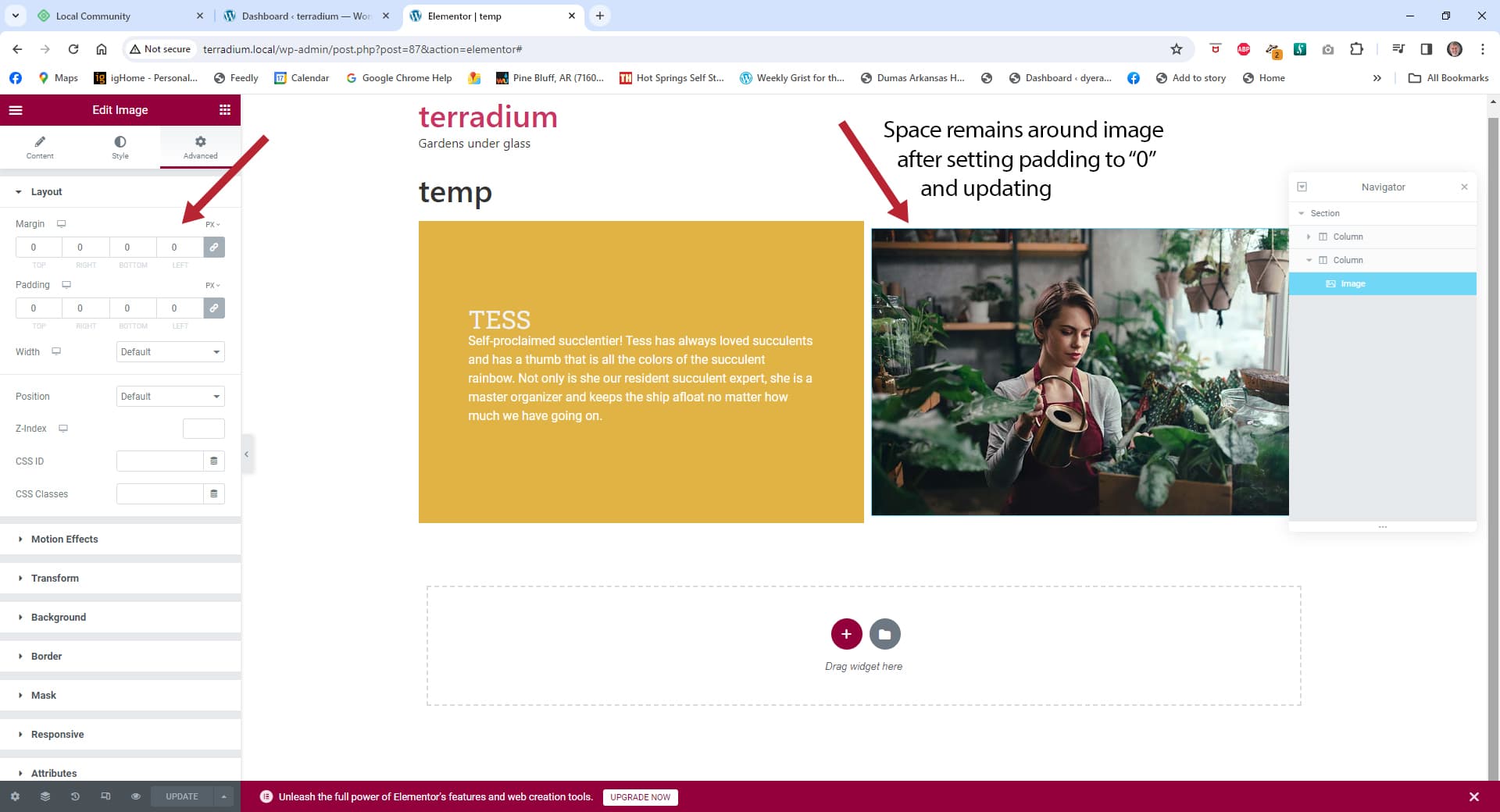
* * *
### System Details
- **Local Version:**
8.1.0+369s
- **Operating System (OS) and OS version:**
Windows 10 Version 22H2 (OS Buikd 19045.3693
* * *
### Local Logs
Attach your Local Logs here ([Help Doc - Retrieving Local’s Log](https://localwp.com/help-docs/troubleshooting/retrieving-locals-log-file/))
[local-lightning.log](https://community.localwp.com/uploads/short-url/AsVjY7STz1xFB6fJZfj22zvSJZJ.log) (366.4 KB)
[local-lightning-verbose.log](https://community.localwp.com/uploads/short-url/nIbrFNSEtXCXyQUCxdxL5yx90W0.log) (939.5 KB)
* * *
_ **Security Reminder** _
Local does a pretty good job of scrubbing private info from the logs and the errors it produces, however there’s always the possibility that something private can come through. Because these are public forums, always review the screenshots you are sharing to make sure there isn’t private info like passwords being displayed.
---
### Author:  [@Nick-B](https://community.localwp.com/u/Nick-B)
#### Post date: [November 22, 2023, 1:55pm UTC](https://community.localwp.com/t/padding-reset-not-working/40082/2 "2023-11-22T13:55:14Z")
Hi @turkey
It seems like this is more of an issue with Elementor and general Web Development and not really with our tool Local.
You might try the resources below for further help with Elementor and Developmental questions:
> **[Help Center » Help](https://elementor.com/help/)**
>
> Help Center
> **[WPBeginner – Beginner’s Guide for WordPress](https://www.wpbeginner.com/)**
>
> WPBeginner is the largest WordPress resource site for WordPress Beginners with easy to understand WordPress tutorials for mastering the basics and beyond.
> **[Elementor Website Builder – More than Just a Page Builder](https://wordpress.org/plugins/elementor/)**
>
> The Elementor Website Builder has it all: drag and drop page builder, pixel perfect design, mobile responsive editing, and more. Get started now!
---
### Author:  [@turkey](https://community.localwp.com/u/turkey)
#### Post date: [November 22, 2023, 3:10pm UTC](https://community.localwp.com/t/padding-reset-not-working/40082/3 "2023-11-22T15:10:04Z")
Nick,
Thank you for pointing me in the right direction.
Joe
---
### Author:  [@sambrockway](https://community.localwp.com/u/sambrockway)
#### Post date: [November 22, 2023, 5:57pm UTC](https://community.localwp.com/t/padding-reset-not-working/40082/4 "2023-11-22T17:57:30Z")
Hi @turkey -
Those resource Nick shared above should be helpful.
But also, I would recommend opening up the preview version of that page, using the “Inspect” tool from within your browser, and clicking on the image.
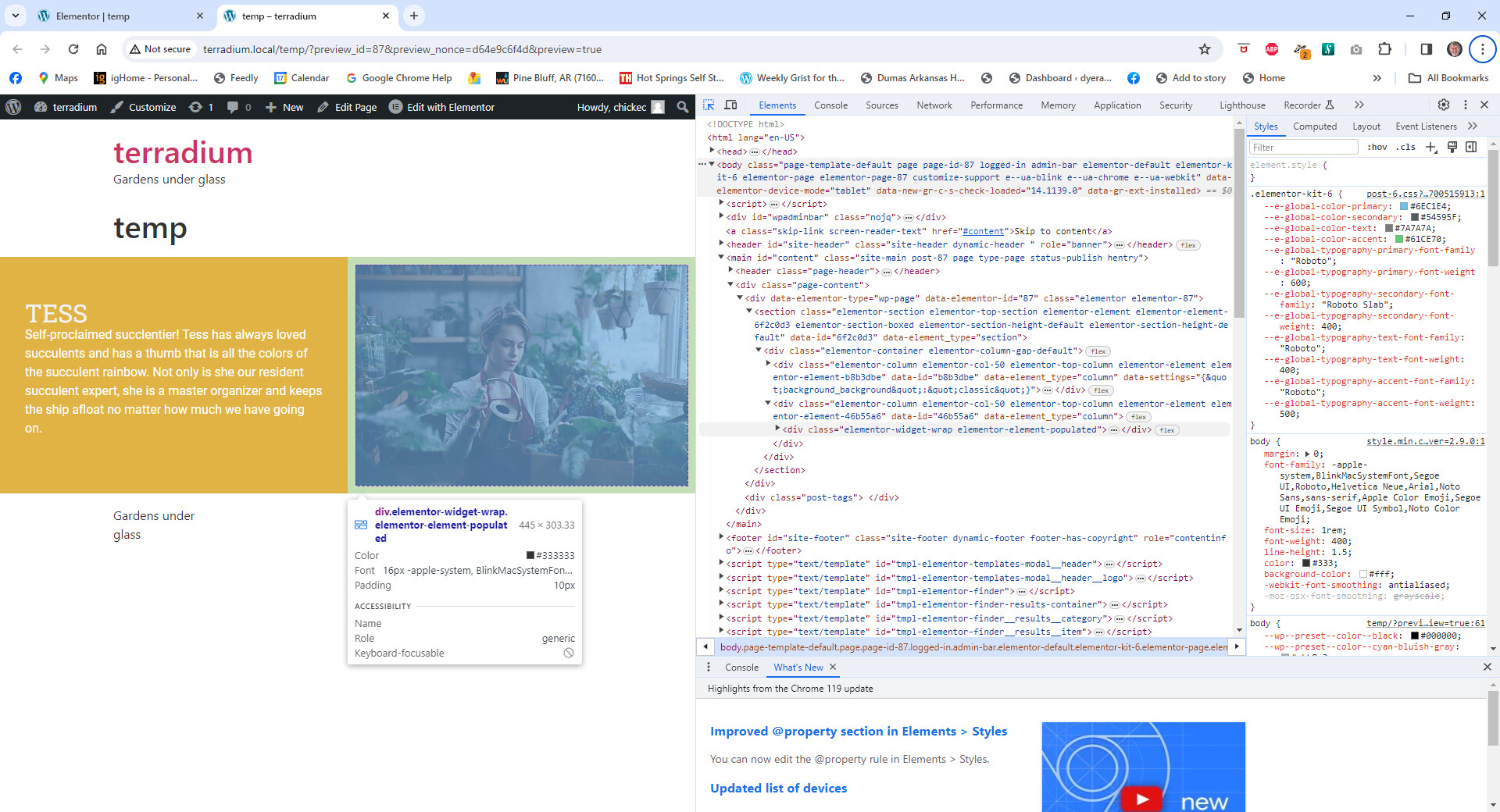
If you kind of hover around the image it will highlight the padded area and you can identify why it has whitespace. I’m wondering if maybe the image needs to be set to fill the container or if there is padding on the column, or something like that.
Let me know if that makes sense.
Sam
---
### Author:  [@turkey](https://community.localwp.com/u/turkey)
#### Post date: [November 22, 2023, 6:15pm UTC](https://community.localwp.com/t/padding-reset-not-working/40082/5 "2023-11-22T18:15:36Z")
Thanks, I’ll check it out.
---
### Author:  [@turkey](https://community.localwp.com/u/turkey)
#### Post date: [November 22, 2023, 6:36pm UTC](https://community.localwp.com/t/padding-reset-not-working/40082/6 "2023-11-22T18:36:50Z")
I managed to find the developer option to show page data, but I only know enough about reading code to be dangerous , but I did find that the only padding that was showing in the computed section was for the entire document. I could not find anything on the Tess image.
Thanks,
Joe

---
### Author:  [@turkey](https://community.localwp.com/u/turkey)
#### Post date: [November 22, 2023, 6:39pm UTC](https://community.localwp.com/t/padding-reset-not-working/40082/7 "2023-11-22T18:39:20Z")
Sam, I only know enough about Reading code to be dangerous , but I did find that the only padding that was showing in the computed section was the padding for the entire the entire document and could not find anything on that Tess image
Thanks, Joe

---
### Author:  [@sambrockway](https://community.localwp.com/u/sambrockway)
#### Post date: [November 22, 2023, 6:42pm UTC](https://community.localwp.com/t/padding-reset-not-working/40082/8 "2023-11-22T18:42:33Z")
Hi!
Can you click this icon?

Then can you hover around the image - you should see borders start to show up, like this (orange):

Sam
---
### Author:  [@turkey](https://community.localwp.com/u/turkey)
#### Post date: [November 22, 2023, 7:00pm UTC](https://community.localwp.com/t/padding-reset-not-working/40082/9 "2023-11-22T19:00:34Z")
Sam, no I did not. I will proceed to just that. Stand by.
Thanks,
Joe
---
### Author:  [@turkey](https://community.localwp.com/u/turkey)
#### Post date: [November 22, 2023, 7:12pm UTC](https://community.localwp.com/t/padding-reset-not-working/40082/10 "2023-11-22T19:12:33Z")
Sam, When you get good instructions it’s amazing what you will find. Low and behold it is showing that there is 10 pixels of padding around the image. And the widget panel or whatever it’s called the image dimensions are set up in EMS instead of pixels oh would one oh solution B to reset the measurements to pixels instead of AMS? If not I’ll wait on your solution.
Thanks,
Joe
---
### Author:  [@turkey](https://community.localwp.com/u/turkey)
#### Post date: [November 22, 2023, 7:22pm UTC](https://community.localwp.com/t/padding-reset-not-working/40082/11 "2023-11-22T19:22:38Z")
Tried the converting measurement unit and it did not work
---
### Author:  [@system](https://community.localwp.com/u/system)
#### Post date: [November 24, 2023, 7:23am UTC](https://community.localwp.com/t/padding-reset-not-working/40082/12 "2023-11-24T07:23:09Z")
This topic was automatically closed 36 hours after the last reply. New replies are no longer allowed.