I noticed that since the site doesn’t really start, I can’t do an export. But, I copied the entire directory to another directory.
I couldn’t do an export since the site wouldn’t start but I saved the site directory. When I started Local, the software didn’t detect the existence of the directory. So it asked me if I wanted to create a site, I said yes with the exact same name but it came back with the directory was already there. So, I deleted the directory and created a new site (same name). I got as far as loading WordPress and got the following error message.
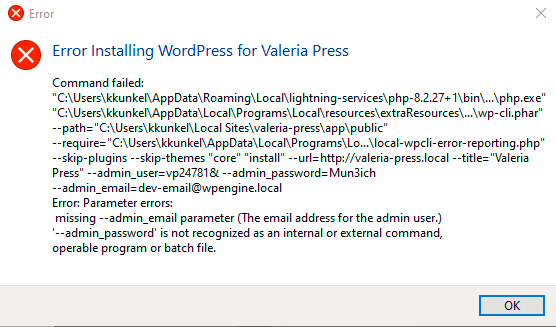
Can you try creating a user without any special characters? On Windows you’ll want to be sure that usernames and passwords have no special characters or spaces.
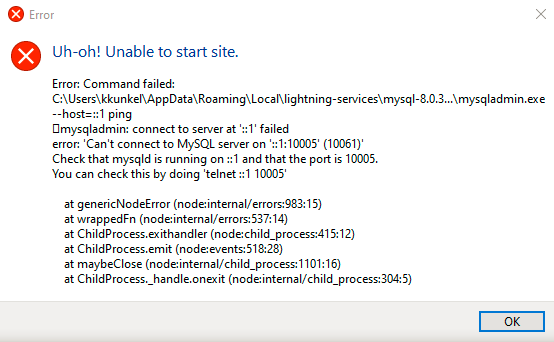

The Telnet output is odd, especially since there seems to be a bunch of special characters within that output.
Can provide an updated zip-archive of the Local Logs by clicking the “Download Local Log” button from the “Support” tab of Local?
Zooming out a bit, the initial lines in the log pointed to some kind of process locking the database tables. In particular, these are the kinds of lines that I’m seeing in the original log that likely prompted Nick to ask about antivirus:
{"class":"Process","level":"warn","message":"2025-10-16T15:28:41.296504Z 1 [ERROR] [MY-012611] [InnoDB] Operating system error number 32 in a file operation.","process":"mysql","thread":"main","timestamp":"2025-10-16T15:28:41.296Z"}
{"class":"Process","level":"warn","message":"2025-10-16T15:28:41.296559Z 1 [ERROR] [MY-012615] [InnoDB] The error means that another program is using InnoDB's files. This might be a backup or antivirus software or another instance of MySQL. Please close it to get rid of this error.","process":"mysql","thread":"main","timestamp":"2025-10-16T15:28:41.297Z"}
It would be good to review an updated Local log to see if the same kinds of errors appear or if there’s more info in there to go on.
Hi, Ben. Yeah, this is looking pretty peculiar. I noticed that when I took a backup and uploaded it to Bluehost, one of my pages was really screwed up even though the page looked fine in Local. Here’s the latest
local-logs4.zip (11.9 KB)
Thanks, Ken
log.
Something very interesting with my screwed up pages. Since I use DuckDuckGo as a Firefox extension, I removed it and my pages were no longer screwed up upon publication. Now, it’s true your software is not using a browser for installation but it’s rather curious.
I’m seeing this error in the logs:
{
  "class": "WordPressInstaller",
  "level": "error",
  "message": "Error installing WordPress",
  "stack": "Error: Command failed: \"%%userDataPath%%\\lightning-services\\php-8.2.27+1\\bin\\win64\\php.exe\" \"%%resourcesPath%%\\bin\\wp-cli\\wp-cli.phar\" --path=\"C:\\Users\\kkunkel\\Local Sites\\valeria-press\\app\\public\" --require=\"%%resourcesPath%%\\bin\\wp-cli\\local-wpcli-error-reporting.php\" --skip-plugins --skip-themes \"core\" \"install\" --url=http://valeria-press.local --title=\"Valeria Press\" --admin_user=vp24781& --admin_password=[REDACTED] --admin_email=dev-email@wpengine.local\nError: Parameter errors:\n missing --admin_email parameter (The email address for the admin user.)\n'--admin_password' is not recognized as an internal or external command,\r\noperable program or batch file.\r\n\n    at genericNodeError (node:internal/errors:983:15)\n    at wrappedFn (node:internal/errors:537:14)\n    at ChildProcess.exithandler (node:child_process:415:12)\n    at ChildProcess.emit (node:events:518:28)\n    at maybeClose (node:internal/child_process:1101:16)\n    at ChildProcess._handle.onexit (node:internal/child_process:304:5)",
  "thread": "main",
  "timestamp": "2025-10-20T20:52:33.007Z"
}
Note that the --admin_user=vp24781& part – I know that an ampersand can sometimes cause issues within a shell environment (which is how Local creates a new site).
Have you tried creating another new site, but with a username and password that don’t include any special characters?
Other than that, I’m not seeing any other obvious issues except that mysqladmin can’t connect to a running MySQL daemon. That kind of issue feels like something that would be caused by antivirus and/or a security setting. As a test, I’d recommend temporarily disabling any antivirus or security settings that might be blocking Local processes.
This section of the help doc might give you some ideas for things to explore:
Going to try this today and see what happens.
Hi, Ben. Uninstalled. Installed the latest version (noticed there was a new one out there).Restarted. Turned off McAfee anti-virus. Created a new site with no special characters. Got past provisioning but it’s stuck on Starting Up Site Services. Here’s the latest log.
local-logs5.zip (4.7 KB)
There’s still not any big differences in the Local log. Is there a way you can record a screencast of the process so I can get a better idea of where things are breaking down?
Ok, what happened? Very strange. It actually built it this time. And I went into WordPress. I’ve uploaded a video of it being created and here’s the log.
Hey @kkunkel70 – I took a look at the screencast and edited your message to hide it from public viewing.
I’m not sure what the difference was. I noticed that it did take a while to provision, which is something we see sometimes on Windows machines. Many of the system processes that Local uses generally run slower than other OSes.
In any event, it seems like Local is able to start a site on this machine!