Unable to create new site on M4 Mac Studio

What issue or error are you experiencing? New install of Local. Can’t create new sites. Keep getting both Uh-oh! Unable to start and Uh-oh! Unable to start errors. I’ve installed Rosetta 2 and tried changing the router already.
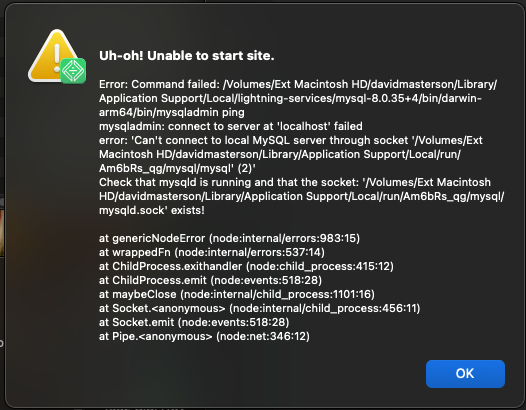

What steps can be taken to replicate the issue? Feel free to include screenshots, videos, etc Nothing out of the ordinary.


System Details

  • Local Version: Version 9.2.6+6872

  • Operating System (OS) and OS version: MacOS Sequoia 15.6 (I’ve installed Rosetta 2)


Local Logs

Attach your Local Logs here (Help Doc - Retrieving Local’s Log)


Security Reminder
Local does a pretty good job of scrubbing private info from the logs and the errors it produces, however there’s always the possibility that something private can come through. Because these are public forums, always review the screenshots you are sharing to make sure there isn’t private info like passwords being displayed.

Thanks for this report and for your logs, @MFRuckus. The logs show this:

[ERROR] [MY-010267] [Server] The socket file path is too long (> 103): 

MySQL has a limit on the length of the socket path. It looks like your path is too long due to the length of the hard drive name combined with your username and Local’s path (106 characters total).

As a workaround you could try renaming your Ext Macintosh HD drive to something at least 3 characters shorter via Disk Utility, if that’s possible for you. Or alternatively create a new admin user (e.g. ‘david’) and try Local in that account.

Sorry that you ran into this, but I hope that helps to explain why.

I’ve installed Rosetta 2

You should not need this as long as you’re using the Apple Silicon version of Local. (You can check by doing “Get Info” on the Local Application icon in your ~/Applications folder. If it says, “Intel” instead of “Apple Silicon”, install the Apple Silicon version of Local here: https://localwp.com/releases/)